API 参考
OZeroSecurity SDK 中所有公共类和方法的完整参考。除非另有说明,所有类都位于 OZeroSDK.Security 命名空间中。
OZeroSecurityManager OZeroSDK.Security
管理所有活动安全模块和安全事件的全局管理器。即使场景切换它也会保持存在,并且可以通过 Instance 属性进行访问。SDK 会在应用启动时自动创建,因此您无需直接进行实例化。
特性
| 姓名 | 类型 | 解释 |
|---|---|---|
| Instance | OZeroSecurityManager | 静态单例访问器。返回活动实例。 |
方法
当项目代码需要接收安全事件时注册回调。OZero 的内置响应会在独立流程中继续执行,因此注册或移除这个回调不会关闭 SDK 的保护行为。回调会收到 OZeroSecurityEvent,其中包含检测区域、公共中止代码、消息键、诊断消息以及应用是否即将关闭。
删除先前注册的用户回调。请务必从 OnDisable 或 OnDestroy 调用它,以避免内存泄漏。
注册供 CustomCallbackOnly 使用的项目回调。仅在原生代码设定不可撤销的致命退出期限后调用。回调可以显示通知或执行简短清理,但不能取消退出或延长期限。
移除已注册的安全终止通知回调。
立即完成已经处于等待状态的致命安全退出。通常从通知对话框的确认按钮调用;若没有待处理退出,则不执行任何操作。
Registers a callback for server-issued policy actions delivered by the Pro device policy heartbeat. Use this for portal policies such as Callback responses. It is separate from local security detection callbacks.
Removes a previously registered policy action callback. Register in OnEnable and unregister in OnDisable when using a scene object.
注册用于接收面向用户的 activation 或 DRM 状态变化的回调。使用 OZero-managed Steam DRM 和默认 Managed Verification UI 时,SDK 已经显示需要联网、重试、timeout 和阻止状态;只有自定义 UI、telemetry 或游戏专用 session gate 需要时才注册。
移除先前注册的 activation 状态回调。在场景对象中使用时,请在 OnEnable 注册并在 OnDisable 解除。
Registers a callback for the shared OZero Managed Verification state used by Pro Build Integrity and Steam DRM. The default SDK UI handles these states automatically when enabled; use this callback only for custom UI, custom telemetry, or game-specific session gates.
Removes a previously registered managed verification state callback. Register in OnEnable and unregister in OnDisable when using a scene object.
Replaces individual built-in verification UI strings at runtime. Use JSON files under Assets/OZeroSecurity/Resources/OZeroLocalization for normal localization, and use this provider only when text must be supplied dynamically.
Removes a previously registered managed verification text provider.
Retries SDK-managed Build Integrity attestation after an online-required or retry-timeout state. The default Managed Verification UI calls this automatically. If your own game server validates OZA tokens, retry your own login or session-refresh request instead.
重试由 OZero 服务器托管的 Steam Activation / DRM 验证。默认 Managed Verification UI 会在 SDK 内部调用匹配的 retry 流程。只有在有意替换默认 UI 的自定义 UI 中才从游戏代码调用它;如果由你的游戏服务器执行 Steam 验证,请改为重试你自己的登录或会话请求。
代表
这是 RegisterUserCallback 使用的回调签名。当需要警告 UI、自有服务器日志或短保存步骤时,请查看 evt.Type、evt.AbortCodeHex、evt.MessageKey、evt.Message 和 evt.WillAbort。如果 evt.WillAbort 为 true,应用已经计划关闭,请避免耗时操作。
例子
using OZeroSDK.Security;
using UnityEngine;

public class MySecurityListener : MonoBehaviour
{
    void OnEnable()
        => OZeroSecurityManager.Instance.RegisterUserCallback(OnThreat);

    void OnDisable()
        => OZeroSecurityManager.Instance.UnregisterUserCallback(OnThreat);

    void OnThreat(OZeroSecurityEvent evt)
        => Debug.Log(
            $"Threat={evt.Type}, Code={evt.AbortCodeHex}, Message={evt.Message}");
}
OZeroSecurityTerminationNoticeEvent class
仅在原生致命退出期限设定后发出的用户侧载荷。它包含原始安全事件,以及可供客户支持使用的稳定支持代码。
| 姓名 | 类型 | 解释 |
|---|---|---|
| SecurityEvent | OZeroSecurityEvent | 原始安全事件。WillAbort 为 true;日志和本地化应使用 AbortCode 与 MessageKey。 |
| SupportCode | string | 玩家可以报告给客户支持的稳定、非敏感代码。 |
显示 UI 或调用回调不会暂停、取消或延长原生致命退出期限。请限制所有处理时间,仅在需要提前退出时调用
OZeroSecurityManager.ExitNow()。OZeroSecurityEvent class
传递给 RegisterUserCallback 的面向客户公开的违规事件。它仅公开稳定且安全的诊断信息,而不是内部检测详情。
| 姓名 | 类型 | 解释 |
|---|---|---|
| Type | ModulationType | 引发违规的安全模块。 |
| AbortCode | OZeroAbortCode | 稳定的公共中止代码类别。 |
| AbortCodeValue | int | 适合在服务器日志中使用的数字代码值。 |
| AbortCodeHex | string | 如 0x0C 这样的十六进制字符串。 |
| MessageKey | string | 可用于本地化和 analytics 分组的稳定英文消息键。 |
| Message | string | 可向客户公开的安全英文诊断消息。 |
| WillAbort | bool | 如果当前响应策略计划在回调返回后或宽限时间结束后终止应用程序,则为 true。 |
OZeroPolicyActionEvent class
Server policy callback payload passed to RegisterUserPolicyActionCallback. These events are issued by the customer portal policy system and delivered on the Unity main thread through the Pro device policy heartbeat.
| 姓名 | 类型 | 解释 |
|---|---|---|
| Module | string | 策略模块,例如 variant、injection、physics 或 user_policy(用户 UUID 封禁规则;强制结束规则结束会话前的 ActionId = "user_blocked")。 |
| ActionId | string | Unique delivery id. The SDK uses it to avoid duplicate dispatch and acknowledge delivery. |
| PolicyId | string | Customer portal policy id when available. |
| Reason | string | Reason configured by the policy or generated from the matched evidence. |
| Score | int | Risk score at the time the policy matched. |
| EventCount | int | Number of events that contributed to the policy match. |
| WindowMinutes | int | Policy evaluation window in minutes. |
| IssuedAtUnixMs | long | Server UTC epoch milliseconds when the action was issued. |
| ExpiresAtUnixMs | long | Server UTC epoch milliseconds when the pending action expires if it is not acknowledged. |
Policy callback example
Use this when a Customer Portal security policy is configured as Callback. The SDK delivers the policy action to the game, and your game decides how to notify, restrict, or move the user.
using OZeroSDK.Security;
using UnityEngine;

public sealed class OZeroPolicyListener : MonoBehaviour
{
    private void OnEnable()
        => OZeroSecurityManager.Instance.RegisterUserPolicyActionCallback(OnPolicyAction);

    private void OnDisable()
        => OZeroSecurityManager.Instance.UnregisterUserPolicyActionCallback(OnPolicyAction);

    private void OnPolicyAction(OZeroPolicyActionEvent evt)
    {
        Debug.LogWarning($"Policy={evt.PolicyId}, Module={evt.Module}, Score={evt.Score}, Reason={evt.Reason}");

        if (evt.Score >= 80)
        {
            ShowSecurityNotice(evt.Reason);
            DisableRankedMatchmaking();
        }
    }
}
OZeroUserActivationStateEvent class
User-facing activation or DRM state payload passed to RegisterUserActivationStateCallback. Steam Activation / DRM uses it to tell the game whether cached offline play is still allowed or online revalidation is required.
| 姓名 | 类型 | 解释 |
|---|---|---|
| Provider | string | Activation provider such as steam. |
| State | string | Stable state such as valid, revalidated, online_required, offline_degraded, or rejected. |
| Reason | string | Reason code such as steam_activation_revalidate_unavailable or steam_activation_cache_expired. |
| Action | string | Portal policy action value associated with this state when available. |
| OfflineAllowed | bool | True only while a verified signed token is inside its offline allowance. |
| OnlineRequired | bool | True when the game should ask the user to reconnect before allowing the protected session. |
| RefreshAtUnixMs | long | UTC epoch milliseconds when online refresh is required. |
| OfflineUntilUnixMs | long | UTC epoch milliseconds when the signed offline allowance ends. |
Activation 状态回调使用条件
OZero-managed Steam DRM 与默认 Managed Verification UI 一起使用时,不需要 activation callback 代码;SDK 会向玩家显示需要联网、重试、timeout 和阻止状态。只有在有意替换默认 UI、添加自己的 session gate,或运行客户游戏服务器验证流程时才注册此回调。不要把 Steam Web API Key 或 OZero Server API Key 放入客户端。
OZeroUserManagedVerificationStateEvent class
传递给 RegisterUserManagedVerificationStateCallback 的面向用户 managed verification payload。Build Integrity 和 Steam DRM 都使用此事件,但默认 Managed Verification UI 会自动消费它。只有自定义 UI、自定义 telemetry 或游戏专用 session gate 需要时,才在游戏代码中处理。
| 姓名 | 类型 | 解释 |
|---|---|---|
| Provider | OZeroManagedVerificationProvider | Source module: BuildIntegrity or SteamDrm. |
| State | OZeroUserManagedVerificationState | Current state such as Checking, Allowed, Warning, OnlineRequired, RetryTimedOut, Blocked, or StandardFallback. |
| Reason | string | Stable reason code suitable for custom UI text, analytics, or customer support logs. |
| Verdict | string | Server verdict when available, such as allow, warn, block, or fallback. |
| CanRetry | bool | True when a Retry action is meaningful for the current provider and state. |
| TimestampUnixMs | long | UTC epoch milliseconds when the state was raised. |
Managed verification 回调使用条件
当 Security Config > Pro - License & Online Services > Online Verification UI > Ui Policy 使用 OZero 内置对话框时,SDK 已经处理 Build Integrity 和 Steam DRM 的 managed-verification UI、重试和 timeout 状态。只有在 Custom UI / Callback Only、额外 telemetry 或游戏专用 session gate 中才注册 RegisterUserManagedVerificationStateCallback。在自定义 UI 模式下,请调用与 Provider 匹配的 retry 方法;在客户游戏服务器模式下,请重试自己的登录或会话请求。
OZeroManagedVerificationUiPolicy enum
决定 SDK 如何向玩家显示来自 Build Integrity 和 Steam DRM 的 managed verification 状态。两个 Built-In policy 都需要 TextMeshPro、TMP Essential Resources 和 optional OZero Built-In TMP Dialog package。若缺少这些条件仍选择 Built-In policy,build preflight 会停止 player build。请在 Window > OZero Security > Check Setup 中点击对应错误项的 Import Package 进行修复。
| 值 | 解释 |
|---|---|
| CustomCallbackOnly | SDK 只触发 RegisterUserManagedVerificationStateCallback 状态。仅在游戏自行实现 UI、重试按钮、timeout 处理和 session gate 时使用。 |
| BuiltInBlockingDialog | 使用 OZero 内置阻止型对话框。对于在线重新验证期间应暂停或阻止受保护会话的正式版本,这是推荐默认值。 |
| BuiltInNonBlockingDialog | 使用 OZero 内置非阻止型提示。只有在引导玩家重试或查看警告时,游戏仍可安全继续的情况下才使用。 |
OZeroSecurityTerminationNoticePolicy enum
控制在已经设定的致命安全退出前显示的可选用户通知。Standard、Pro 许可证均可使用。
| 值 | 解释 |
|---|---|
| Disabled = 0 | 不显示终止通知。原生致命退出期限仍然有效。 |
| OZeroBuiltIn = 1 | 显示已本地化的 OZero 内置对话框,并在玩家确认时提前退出。 |
| CustomCallbackOnly = 2 | 调用已注册的终止通知回调,使项目可以显示自定义 UI。不能取消或延长退出。 |
OZeroManagedVerificationTimeoutAction enum
当在线必需或重试状态未在配置的超时时间内解决时,决定内置 managed verification UI 的处理方式。
| 值 | 解释 |
|---|---|
| KeepDialog | timeout 后继续显示对话框。仅在希望玩家持续手动重试的流程中选择。 |
| BlockSession | timeout 后阻止受保护会话。在线验证必须成功但应用仍需保持打开时,这是推荐默认值。 |
| AbortApplication | timeout 后终止应用。仅在发布策略要求未解决的验证失败必须立即退出时使用。 |
| InvokeCallbackOnly | 不执行内置阻止或退出行为,只触发 callback。用于完全自定义的会话控制。 |
ModulationType enum
标识哪个安全模块发出了警报。通过 OZeroSecurityEvent.Type 传递。
| 值 | 解释 |
|---|---|
| MemoryModulation | 以可疑方式访问的安全类型变量 |
| SpeedHack | 检测到速度黑客或时间操纵 |
| TimeHack | 检测系统时钟异常(倒流、NTP 不匹配) |
| Injection | 检测内存注入工具(Frida等)或非法DLL |
| PhysicsHack | 检测到不可能的位置变化(由 OZeroPhysicsHackDetector 触发 — 必须将组件直接附加到玩家对象并进行初始化) |
| DeviceBindingModulation | 保存数据是从与其绑定的设备不同的设备加载的 |
| InstallSource | 应用安装自非授权商店 |
| BuildIntegrity | 程序集哈希不匹配、已连接调试器或平台检查失败 |
| EnvironmentModulation | 检测模拟器或异常运行环境 |
| SteamAntiPiracy | 当 Steam 所有权或票证验证失败时发生。 |
| InjectionScannerUnavailable | 原生注入扫描器无法运行(fail-close;abort code 0x15,非攻击检测) |
OZeroBootstrapper OZeroSDK.Security
负责初始化 SDK 的自动启动入口点。您不需要在项目代码中直接调用。它根据 Unity 启动流程加载安全设置,并在游戏开始前准备好激活的检测器。
OZeroSecurityConfig,在 Project Settings 中编辑)。
OZeroSecurityConfigRuntime OZeroSDK.Security
在玩家运行时读取和验证受保护的构建设置的配置加载程序。验证打包的设置,准备内存中的 OZeroSecurityConfig 运行设置,并在验证失败时应用配置的威胁响应策略。
特性
| 姓名 | 类型 | 解释 |
|---|---|---|
| Current | OZeroSecurityConfig | 通过读取玩家构建中包含的受保护设置而创建的设置快照。首次访问时调用 EnsureLoaded()。 |
方法
可以安全重复调用的加载器。第一次调用验证并加载打包设置,后续调用重用相同的设置快照。失败处理遵循配置的响应策略。
OZeroSecurityConfig 和 Unity 编辑器窗口视为支持的集成表面。
OZero Secure Variables OZeroSDK.Security
可替代常规数字、字符串和向量类型的加密类型。值存储在受保护的内存区域中,并支持大多数算术运算符和隐式转换。只需更改类型名称即可应用于现有代码。
支持类型
| 类 | 替代类型 |
|---|---|
| OZeroSV_Int | int |
| OZeroSV_Int64 | long |
| OZeroSV_UInt | uint |
| OZeroSV_UInt64 | ulong |
| OZeroSV_Short | short |
| OZeroSV_UShort | ushort |
| OZeroSV_Byte | byte |
| OZeroSV_Float | float |
| OZeroSV_Double | double |
| OZeroSV_Decimal | decimal |
| OZeroSV_Bool | bool |
| OZeroSV_String | string |
| OZeroSV_Vector2 | Vector2 |
| OZeroSV_Vector3 | Vector3 |
| OZeroSV_Buffer | byte[] |
支持的运算符
数字类型(Int、Int64、UInt、UInt64、Short、UShort、Byte、Float、Double、Decimal)支持算术(+ - * / %)、比较(== != < > <= >=)、复合赋值 (+= -= *= /=)、递增/递减 (++ --) 运算符以及与基本类型的隐式转换。Vector2·Vector3 支持算术和等式运算符,而 Bool 仅支持等式运算符。字符串支持 ==、!=、+。Buffer 可以通过索引运算符直接访问字节数组。
OZeroSafePlayerPrefs OZeroSDK.Security
可以像 Unity 的 PlayerPrefs 一样使用的加密存储。由于密钥名称和值均受到保护,因此即使直接打开 Windows 注册表或 iOS 配置文件,也很难读取原始值。
方法
提供常见的 PlayerPrefs 风格方法,并额外提供 Int64、Double、Bool、IncrementInt 辅助方法。已有的 plain PlayerPrefs 值不会自动迁移;请从今后需要保护的 key 开始使用 OZeroSafePlayerPrefs。
OZeroSafePlayerPrefs 写入的数据与标准 PlayerPrefs 不兼容。在两者之间切换将使现有数据无法读取。
OZeroSV_File OZeroSDK.Security
使用内部加密逻辑保护文件的读写。由于不使用设备绑定密钥,因此即使像 Steam 云存档那样需要在多台设备上读取同一个存档文件,也可以使用。如果故意篡改文件,读取时的完整性检查将会失败并抛出 InvalidDataException。
OZeroSV_File API 处理。
方法
加密 contents 并保存到 path。父文件夹不会自动创建,必要时请先调用 Directory.CreateDirectory。
读取 path 指定的文件,验证完整性后返回解密后的字符串。如果文件被篡改,将抛出 InvalidDataException。
加密数据并安全保存到 path。
读取 path 指定的文件。在读取时验证文件的完整性,并检测是否发生篡改。
解密已经加载到内存中的加密字节缓冲区。适用于远程下载或自定义存储后端,无法将文件路径传给 ReadAllText 的情况。
示例代码
using OZeroSDK.Security;

string path = Application.persistentDataPath + "/save.json";
string json = JsonUtility.ToJson(saveData);

// Write (encrypts automatically)
OZeroSV_File.WriteAllText(path, json);

// Read (decrypts + integrity check)
try
{
    string loaded = OZeroSV_File.ReadAllText(path);
    saveData = JsonUtility.FromJson<SaveData>(loaded);
}
catch (System.IO.InvalidDataException)
{
    // File was tampered — handle accordingly
    Debug.LogError("Save file integrity check failed.");
}
OZeroBuildIntegrityValidator OZeroSDK.Security
处理构建篡改、调试器/计时异常、平台原生完整性检查以及可选的 Pro 服务器验证的验证器。当 OZeroSecurityConfig 中启用构建完整性时,由 SDK 自动创建。
检查项目
| 测试 | 解释 |
|---|---|
| Assembly / Manifest | 在支持的构建目标上验证生成的完整性清单和托管程序集状态。 |
| Debugger / Timing | 检测附加的调试器、异常定时间隔、靠近断点的延迟,并抑制常见的焦点丢失误报。 |
| Platform Native | 启用后,执行特定于平台的检查,例如 Android 包/签名、iOS 越狱和桌面运行时状态等。 |
| Pro Attestation | 如果开启了 Pro 服务器验证,本地检查通过后会向服务器请求验证令牌。如果没有自己的游戏服务器,OZero 服务器也可以一同返回允许/警告/阻断的结果。 |
公共属性
| 姓名 | 类型 | 解释 |
|---|---|---|
| Instance | OZeroBuildIntegrityValidator | 当前验证器实例(如果创建了模块)。 |
| LastValidationResult | bool? | 这些是最新的本地验证结果。在第一次验证之前,它是 null。 |
| IsValidating | bool | 如果验证正在运行,则为 true。 |
| IsIntegrityVerified | bool | 如果最近激活的本地检查通过,则为 true。 |
| OZeroOnlineAttestation.Token | OZeroBuildAttestationToken | 这是最新的 Pro 证明令牌。在服务器证明成功或失败之前为空,并且令牌包含用于重用跟踪的唯一 ID。 |
事件和方法
当所有启用的本地检查通过时调用。
当启用的本地检查或 Pro 证明拒绝构建时调用。
在线附加组件中为 OZeroOnlineAttestation.OnAttestationPassed:服务器证明成功且 OZeroOnlineAttestation.Token 持有有效令牌时调用。
在线附加组件中已移至 OZeroOnlineAttestation.RequestGameServerAttestation。仅限 CustomerGameServer:本地检查通过后,使用服务器签发的 audience、64 位 hex challenge 和 session ID 开始证明;令牌通过 OZeroOnlineAttestation.TokenReady 送达。参见使用服务器 API 密钥集成游戏服务器。
开始手动验证。对于一般项目,建议使用仪表板的启动/定期验证设置。
OZeroBuildAttestationToken
Pro attestation 的结果。将 AttestToken 发送到游戏服务器,并在登录、PvP、排行榜或货币流程使用前调用 IsValid(nowMillis) 确认有效性。
超过服务器颁发的过期时间后返回 true。
令牌成功签发且尚未过期时返回 true。
OZeroSpeedHackDetector OZeroSDK.Security
使用五个独立的检测信号检测速度黑客和时间操纵。仅在信号相互确认时才报告威胁,从而减少误报。
检测信号
| 信号 | 解释 |
|---|---|
| TimeScale | 检查游戏的时间流逝是否异常改变 |
| API Clock | 比较平台时间与原生参考时间以检测较大差异 |
| Thread Drift | 观察 Unity 运行时时间与原生参考时间的流逝差异 |
| Time Backward | 检测设备时间异常倒退的情况 |
| NTP | 可选 — 与可靠的外部时间参考进行交叉检查(需要网络) |
检测通过带有 ModulationType.SpeedHack 或 ModulationType.TimeHack 的 OZeroSecurityManager 回调进行。设置在 OZeroSecurityConfig 中。
OZeroWatchdog OZeroSDK.Security
用于可信长时间加载工作的公共 helper。在同步工作可能合理地阻塞 Unity 主线程超过发布版 deadline 时,有限延后原生 Watchdog heartbeat deadline。
方法
开始一个受限的 loading grace scope。可信加载工作完成后,请立即调用返回 scope 的 End() 或 dispose 它。支持嵌套 scope;最后一个 scope 结束后会恢复正常 Watchdog timing。
手动结束此 loading grace scope。Dispose() 会调用相同逻辑,因此 using 块和显式 End() 等效。
用于同步加载工作的便捷 wrapper。它创建 loading grace scope,执行 work,并通过 using 块安全结束 scope。
示例
using OZeroSDK.Security;
using UnityEngine.SceneManagement;

public void LoadLargeScene()
{
    using (OZeroWatchdog.BeginLoadingGrace(60000))
    {
        SceneManager.LoadScene("Battle", LoadSceneMode.Single);
    }
}OZeroInjectionDetector OZeroSDK.Security
检查正在运行的游戏是否附加了可疑模块,或者是否存在挂钩或调试器痕迹。定期检查在可能的情况下会使用稍微变动的检查时间,使简单的绕过尝试变得更加困难。
检测目标
| Runtime module | 意外的运行时模块或涉嫌挂钩的信号 |
| Debugger | 涉嫌调试器或跟踪工具连接的信号 |
| Memory map | 异常的运行时内存或模块状态信号 |
| Illegal DLL | 加载到进程中的未授权托管程序集信号(Windows/Unity 编辑器) |
检测通过带有 ModulationType.Injection 的 OZeroSecurityManager 回调进行。
OZeroPCStoreAntiPiracy OZeroSDK.Security
Steam Anti-Piracy 的运行时控制 API。大多数项目只需在 Config Dashboard 中设置;如果游戏提供自己的策略 UI 或 QA 开关,可以通过这个静态 API 临时覆盖本地检测动作。还提供可选 DLC 的所有权查询(QueryDlcOwnership)。
OZeroPCStoreDetectionAction
| 值 | 解释 |
|---|---|
| Off | 不应用本地 Steam Anti-Piracy 响应。仅用于受控排查情况。 |
| Observe | 只记录诊断信息,并允许游戏继续运行。 |
| Callback | 触发 OZeroSecurityManager 回调,让游戏能够显示 UI、记录日志或自行处理。仅靠此选项不会自动终止应用程序,实际是否终止取决于 Global Threat Response 设置和项目的回调处理方式。 |
| Block | 将违规视为阻断策略。实际应用是否终止遵循 Global Threat Response 设置。 |
方法
在运行时覆盖本地 Steam Anti-Piracy 检测动作。适用于 QA 构建中临时降级为 Observe,或让操作员从管理员菜单中选择特定操作。
清除运行时覆盖的操作,恢复为在 OZeroSecurityConfig 或 Pro 门户中设置的基本操作。
示例
using OZeroSDK.Security;

// QA session: observe Steam violations without blocking gameplay.
OZeroPCStoreAntiPiracy.SetDetectionActionOverride(
    OZeroPCStoreDetectionAction.Observe);

// Restore the dashboard/server policy.
OZeroPCStoreAntiPiracy.ClearDetectionActionOverride();
最近验证结果
返回最近一次 Steam 验证快照,包括 reported AppID、BuildID、SteamID、服务器验证状态、soft signal 和 native score 字段。可用于调试 UI 或 QA 报告,但不要作为唯一的游戏权限判断依据。
QueryDlcOwnership
查询当前 Steam 用户是否拥有某个可选 DLC。这是只查询、不会终止游戏的 API,用于解锁 DLC 内容等判断。加入 requiredDlcAppIds 的必需 DLC 会在启动时自动检查,无需调用此 API。请使用此 API,而不是直接调用 Steamworks.NET。
| 字段 | 解释 |
|---|---|
| bool Owned | 当前账户是否拥有该 DLC(以 Steam BIsSubscribedApp 为准)。请用此值判断是否解锁内容。 |
| bool Installed | 该 DLC 是否已安装在此电脑上。已拥有但未安装(尚未发布或未下载的 DLC)属于正常状态,不是违规。 |
| bool CrossCheckConsistent | Steam API 各响应之间是否一致的检查结果。这只是响应之间的一致性检查,并非篡改证据,请勿仅凭此值判断是否拦截。 |
| string Reason | owned、not_owned、verification_unavailable(Steam 尚未就绪等原因无法应答)、bridge_unavailable(此构建中没有 Steam 桥接,包括编辑器和关闭 Steam Anti-Piracy 的构建)。失败时不会抛出异常,而是返回 Owned=false 和此值。 |
using OZeroSDK.Security;

// Optional DLC: unlock the content only when the account owns it.
OZeroDlcOwnership dlc = OZeroPCStoreAntiPiracy.QueryDlcOwnership(1234560);
if (dlc.Owned)
{
    UnlockExpansion();
}OZeroInstallSourceValidator OZeroSDK.Security
Android 安装来源验证器。启用 Install Source 后组件会自动创建。客户代码通常读取最近结果,用于支持 UI、诊断日志或按商店分流处理。
方法和事件
安装来源确认完成后调用。
返回最近一次检查的缓存结果。
必要时先进行初始化,然后返回 Android 安装来源结果。
InstallSourceResult
| DetectedSource | 解析后的安装来源,类型是 AndroidInstallSource enum。 |
| RawInstallerPackage | Android PackageManager 返回的原始 installer package name。 |
| IsAuthorized | 如果本地配置以及启用时的 Pro 服务器策略允许该安装来源,则为 true。 |
| ServerVerified | 仅限 Pro。如果服务器验证调用已完成,则为 true。 |
| ServerAuthorized | 仅限 Pro。当 ServerVerified 为 true 时的服务器端授权状态。 |
AndroidInstallSource
InstallSourceResult.DetectedSource 返回的准确 enum 值。manual 中的商店名称只是便于阅读的显示名;代码中请与下面这些 enum 名称比较。
| 值 | 解释 |
|---|---|
| GooglePlayStore | 从 Google Play Store 安装。 |
| SamsungGalaxyStore | 从 Samsung Galaxy Store 安装。 |
| AmazonAppstore | 从 Amazon Appstore 安装。 |
| HuaweiAppGallery | 从 Huawei AppGallery 安装。 |
| OneStore | 从 ONE Store 安装。 |
| XiaomiGetApps | 从 Xiaomi GetApps 安装。 |
| OppoAppMarket | 从 OPPO App Market 安装。 |
| VivoAppStore | 从 Vivo App Store 安装。 |
| Custom | 原始 installer package 与 customAuthorizedPackages 匹配。 |
| ADB | Android 返回空 installer package,通常出现在 ADB 或 sideload 方式安装时。 |
| DetectionFailed | 由于 JNI 或平台 API 不可用,installer 查询本身失败。这与 ADB 不同。 |
| Unknown | Android 返回了 package name,但它既不在内置列表中,也不在自定义允许列表中。 |
| Editor | 在 Unity Editor 中运行时返回。 |
| NotApplicable | 在不适用 Android 安装来源概念的平台上返回。 |
OZeroDeviceBindingDetector OZeroSDK.Security
用于绑定到设备的存档槽和客服重置流程的辅助 API。启用 Device Binding 后,验证器会自动启动。只有在需要把云存档、账号存档槽等数据绑定到当前设备时,才需要直接调用下面的 token 方法。
方法
准备本地设备指纹,然后进行注册或验证。普通项目中通常会在 SDK 启动时自动调用。
创建一个将存档槽 key 与当前设备关联的令牌。请将令牌保存在存档元数据或服务器记录中,不要放入玩家可编辑的存档正文。
检查已保存的存档槽令牌是否与当前设备匹配。如果不匹配,SDK 会触发配置好的 Device Binding 违规响应。
返回当前设备指纹 hash 的调试/演示用辅助方法。不要在正式游戏代码中显示、上传或保存这个值。
清除此设备上保存的指纹,并重新绑定当前设备。在玩家构建中,如果配置了 Pro 许可证和服务器设置,非空令牌会在后台作为服务器签发的 Reset Token 验证,因此解除会在此调用返回之后发生;如需等待结果,请使用 ClearStoredFingerprintAsync。其他情况下由授权回调判断,并通过 AuthorizationToken 接收令牌。不使用服务器 Reset Token 时,请使用 RequestReset。
ClearStoredFingerprint 的可 await 形式。请在主线程上调用并 await,清除指纹后返回 true。服务器检查不会阻塞主线程,因此在 HTTP 运行于主线程的环境(Windows 和 macOS IL2CPP、WebGL)中游戏也不会卡住。
请求清除已保存的指纹。在玩家构建中由授权回调判断,reason 会传给回调供你记录日志。批准后,SDK 会清除指纹,在同一会话中重新绑定当前设备并返回 true。在编辑器中始终会解除。
注册游戏的回调,用于在玩家构建中批准(true)或拒绝解除。传入 null 可移除回调。回调会在请求解除的线程上同步调用。没有授权回调时,除非提供有效的服务器 Reset Token,玩家构建会拒绝解除。
true。始终返回 true 的回调会让进程中的任何代码都能清除绑定。随附的演示场景仅为演示而批准所有请求。
OZeroDeviceBindingResetRequest
传给授权回调的只读结构体。
传给 RequestReset 的原因;没有时为空字符串。
传给 ClearStoredFingerprint 的令牌;没有时为空字符串。
示例
using OZeroSDK.Security;

var detector = OZeroDeviceBindingDetector.Instance;
string slotKey = "account:1234:slot:main";

string token = detector.BindToSaveSlot(slotKey);
// Store token next to your save metadata.

bool ok = detector.ValidateSaveSlot(slotKey, token);

// Reset flow: register an authorizer that performs your own check.
OZeroDeviceBindingDetector.SetResetAuthorizer(request =>
    MyAccountService.HasVerifiedResetFor(request.Reason));
bool cleared = detector.RequestReset("ticket-1234");
OZeroSecurityConfig ScriptableObject
OZero 模块的安全设置。在编辑器中通过 Edit > Project Settings > OZero Security 编辑,并保存在 ProjectSettings/OZeroSecuritySettings.asset(共享)和 UserSettings/OZeroSecuritySecrets.json(按用户保存的机密)中;构建时会烘焙进玩家包。在代码中用 OZeroSecurityConfig.Instance 读取当前设置;要在编辑器脚本中修改,请使用 OZeroSecurityProjectSettings(Load、LoadOrCreate、Save)。
字段
字段会分组到 Response、Integrity 等嵌套设置类中。下表汇总了代码中经常查看或集成时经常调整的字段;完整 Inspector 设置表请参考 manual。默认值以代码中保存的序列化初始值为准。如果发布构建中运行时值会被强制改写,则用 * 标记。
| 字段 | 类型 | 默认 | 解释 |
|---|---|---|---|
| - 顶部 - | |||
| developerSecret | string | "" | 用于保护 OZeroSV_File 和 OZeroSafePlayerPrefs 数据的项目级 secret。首次发布前请在 Config Dashboard 中使用 Generate Secure Secret 生成,发布后不要更改。更改后,新版本将无法解密现有受保护数据。 |
| enableLog | bool | true | 启用 SDK 调试日志。它对开发/QA 排查原因有帮助,但发布构建的日志暴露策略需要单独确认。 |
| enableFailureDiagnostics | bool | false | 将安全失败诊断文件写入 Application.persistentDataPath。仅在 QA 或客户支持调查期间启用,确认后请再次关闭。 |
| - 回复 - | |||
| response.forceQuitOnDetection | bool | true | 决定确认威胁时应用是否自动退出。QA 期间可以关闭并只观察事件,但发布构建应根据项目策略明确选择。 |
| response.fatalCallbackGraceSeconds | float | 10 | 威胁检测后,游戏侧安全回调 UI 可以向玩家显示提示的最长时间(秒)。只有明确需要立即退出时才设置为 0。 |
| securityTerminationNoticePolicy | OZeroSecurityTerminationNoticePolicy | Disabled | 适用于全部许可证、针对已处于等待状态的致命安全退出的可选通知策略。 |
| securityUiDialogPrefabResourcePath | string | "" | 共享安全 UI prefab 的可选 Resources 路径。留空时使用 SDK 默认值。 |
| securityUiLanguageCode | string | auto | 共享安全 UI 文本的语言代码。auto 跟随 Application.systemLanguage。 |
| securityUiFallbackLanguageCode | string | en | 所选共享本地化 JSON 缺失时使用的回退语言。 |
| — Managed Verification UI — | |||
| Security Config > Pro - License & Online Services > Online Verification UI > Ui Policy (Pro) | OZeroManagedVerificationUiPolicy | BuiltInBlockingDialog | 选择 OZero Managed Build Integrity 和 Steam DRM 状态的用户界面流程。内置模式让 SDK 处理 nonce/attest、managed session verification、联网提示、重试和 timeout UI。只有替换 SDK 对话框时才使用 Custom UI / Callback Only。 |
| Security Config > Pro - License & Online Services > Online Verification UI > Retry Timeout Seconds (Pro) | int | 15 | 玩家点击 Retry 后,报告 retry-timeout 前等待的最大秒数。 |
| Security Config > Pro - License & Online Services > Online Verification UI > Online Required Timeout Seconds (Pro) | int | 120 | 保持在线必需状态并应用配置的 timeout action 前等待的最大秒数。 |
| Security Config > Pro - License & Online Services > Online Verification UI > Timeout Action (Pro) | OZeroManagedVerificationTimeoutAction | BlockSession | 选择 timeout 时是保持对话框、阻止受保护会话、终止应用,还是仅调用 callback。 |
| Security Config > Pro - License & Online Services > Online Verification UI > Auto Retry When Network Restored (Pro) | bool | false | 网络连接恢复后自动重试 managed verification。仅在无需玩家明确操作也可以安全重试的游戏流程中启用。 |
| - 完整性 - | |||
| integrity.useIntegrity | bool | true | 用于启用 Build Integrity 模块的主开关。 |
| integrity.validateOnStartup | bool | true | 在 Start() 运行时执行完整的完整性检查。 |
| integrity.periodicCheckInterval | float | 300 | 定期重新验证运行之间的时间间隔(秒)。代码默认值为 300,设置为 0 或更小会禁用定期检查。 |
| integrity.checkAssemblyHash | bool | true | 针对 OZeroAssemblyManifest 编译的程序集的 SHA-256/公钥令牌验证。 |
| integrity.checkDebugger | bool | true | 检测附加的托管调试器、Unity 调试构建标志、CPU 时序异常。 |
| integrity.checkPlatformNative | bool | true | 运行特定于平台的本机检查(Root、越狱、APK 签名、Windows 代码签名等)。 |
| integrity.failIfManifestMissing | bool | false* | 将 manifest 丢失或加载失败视为违规。*在非 development 的 player build 中,无论序列化值如何都会强制为 true。 |
| integrity.failIfAssemblyHashBlobMissing | bool | false* | 将生成的程序集哈希 blob 丢失视为违规。*在非 development 的 player build 中会强制为 true。 |
| integrity.requireManifestSignature | bool | false* | 要求 manifest 具有有效签名。请在 Window → OZero Security → Config & Dashboard 中使用 Generate Key Pair 生成密钥。*在发布 player build 中会强制为 true。 |
| integrity.il2cppHashGlobalGameManagers | bool | false | 在 IL2CPP 桌面(Windows、macOS、Linux)文件哈希中包含 globalgamemanagers。Standard 和 Strict 预设会开启此项。 |
| integrity.il2cppHashSharedAssets | bool | false | 在 IL2CPP 桌面文件哈希中包含 sharedassets* 文件。Standard 和 Strict 预设会开启此项。 |
| integrity.il2cppHashSceneFiles | bool | false | 在 IL2CPP 桌面文件哈希中包含 level* 等 Unity 场景文件。Standard 和 Strict 预设会开启此项。 |
| integrity.blockEmulator | bool | true | (Android) 将模拟器检测视为完整性违规。 |
| Security Config > Build Integrity > Pro - Online > Check Integrity With Server (Pro) | bool | false | 开启 Pro 的 nonce → attest 流程。与 OZero Managed 和默认 Managed Verification UI 一起使用时,SDK 会在无需游戏代码的情况下提交构建完整性证据、请求 managed session 判定,并处理面向用户的 retry/timeout 状态。 |
| Security Config > Build Integrity > Pro - Online > Attestation Verification Mode (Pro) | enum | OZeroManaged | 选择由谁完成最终验证。默认值以及 Low、Standard 安全预设使用 OZeroManaged,由 SDK 向 OZero 请求验证结果。Strict 预设使用 CustomerGameServer:游戏服务器提供绑定信息,客户端调用 RequestGameServerAttestation(...),再由游戏服务器验证 OZA 令牌。使用服务器验证还需单独启用 checkIntegrityWithServer。若许可证等级不是 Pro,无论应用哪个预设都会保持 OZeroManaged。 |
| Security Config > Build Integrity > Pro - Online > Attestation Network Policy (Pro) | enum | RequireOnlineRevalidation | 目前只支持 RequireOnlineRevalidation。无法完成或刷新服务器验证时,SDK 会进入 OnlineRequired 状态,要求重新联网验证。不提供接受未验证离线会话的选项。 |
| — Install Source (Android) — | |||
| installSource.useInstallSource | bool | true | Install Source验证主开关。 |
| installSource.allowGooglePlayStore | bool | true | 允许从 Google Play 安装(您还可以切换 Galaxy Store、Amazon Appstore、AppGallery、OneStore 等的各个商店标志)。 |
| Security Config > Install Source (Android Only) > Pro - Online > Check Installer With Server (Pro) | bool | false | 本地检测后调用 /v1/install-source/verify,让 Pro 服务器应用托管 allowlist 并记录审计数据。 |
| installSource.allowDetectionFailed | bool | false | Android installer 查询本身失败时仍允许启动。除非有经过测试的设备级原因,发布构建中请保持关闭。 |
| installSource.allowUnknownSources | bool | false | 允许不在内置列表、也不在 customAuthorizedPackages 中的 installer package。 |
| — Steam Anti-Piracy — | |||
| steamAntiPiracy.useSteamAntiPiracy | bool | false | Steam 启动、权限、必需 DLC 所有权和发布 hygiene 检查的 master switch。 |
| steamAntiPiracy.detectionAction | OZeroPCStoreDetectionAction | Callback | Steam 验证失败时使用的本地响应。Observe 只记录诊断信息,不触发回调。Callback 会触发安全回调,当 reportViolationToCallback 关闭时降级为 Observe。Block 无论该设置如何都会强制触发回调。两种情况下是否退出应用都由 forceQuitOnDetection 决定,因此仅设置 Block 不会终止应用。Pro 策略可能覆盖该值。 |
| Security Config > Steam Anti-Piracy (PC Only) > Pro - Online > Check Steam DRM With Server (Pro) | bool | false | 启用基于服务器证据的 Steam DRM 验证。与 OZero Managed 和默认 Managed Verification UI 一起使用时,SDK 会处理 Steam ticket 提交、activation token cache、需要联网 UI、重试和 timeout 状态。 |
| Security Config > Steam Anti-Piracy (PC Only) > Pro - Online > Steam Drm Verification Mode (Pro) | enum | OZero Managed | 选择由 OZero 托管验证,或由客户游戏服务器负责验证。与默认 Managed Verification UI 搭配时,OZero Managed 是无需自有后端的集成路径。 |
| Security Config > Steam Anti-Piracy (PC Only) > Pro - Online > Steam Drm Network Policy (Pro) | enum | RequireOnlineRevalidation | 需要 Steam DRM 再验证但客户端无法连接服务器时,将进入需要联网状态。默认 Managed Verification UI 模式会自动显示重试流程。 |
| — Device Binding — | |||
| deviceBinding.useDeviceBinding | bool | true | 在 SDK 启动时开启 Device Binding 验证。 |
| deviceBinding.hardwareChangeTolerance | int (0–3) | 1 | 决定设备指纹中的多少项发生变化时仍视为同一设备。 |
| Security Config > Device Binding > Pro - Online > Verify Device With Server (Pro) | bool | false | 仅限 Pro。通过 /v1/device/register 和 /v1/device/verify 注册并验证设备指纹。网络失败本身不会阻止游戏,但服务器明确拒绝时会成为 Device Binding 违规。 |
| — 速度黑客 — | |||
| speedHack.useSpeedHack | bool | true | 速度黑客检测器主开关。 |
| speedHack.checkInterval | float | 1.0 | 检查间隔(秒)。过小或过大的值都会自动限制在安全范围内。 |
| speedHack.requiredDetections | int | 3 | 判定为违规之前所需的连续可疑样本数。过小或过大的值都会自动限制在安全范围内。 |
| speedHack.detectSlowHack | bool | false | 同时检测慢速时间篡改。为减少游戏中正常慢动作的误报,默认关闭。 |
| speedHack.useWebTimeValidation | bool | true | 启用与外部端点的基于 HTTPS HEAD 的游戏时间交叉验证。 |
| speedHack.webTimeUrls[] | string[] | [] | 用于 Web 时间交叉验证的 HTTPS 地址列表。请设置两个以上由您管理或信任的地址。如果列表为空,Web 时间验证将没有可用地址。 |
| speedHack.minSuccessfulEndpoints | int | 2 | 一次 web-time 检查回合要被视为成功,webTimeUrls 中至少有多少个地址必须返回有效 Date 标头。 |
| speedHack.maxConsecutiveFailures | int | 6 | web-time 检查回合连续失败达到此次数后,执行 onWebTimeUnavailable 策略。 |
| speedHack.onWebTimeUnavailable | WebTimeUnavailablePolicy | WarnOnly | 多次无法确认 Web/服务器时间时的策略。WarnOnly 只记录日志并继续运行。Strict 会在反复失败后触发 SpeedHack 事件。Silent 不记录日志,仅应保留给特殊测试。在 WebGL 上,浏览器安全策略不允许读取其他域名的 Date 头,Web 时间校验总是失败,因此 Strict 会按 WarnOnly 执行。 |
| speedHack.enableRemoteSpeedHackConfig | bool | true | 从 Pro 服务器获取 Speed & Time Hack 设置。新设置默认为 true;安全预设仅在许可证等级为 Pro 时开启,在 Standard 中关闭。只有在门户中设置了值的项目才会覆盖本地值,这不仅包括阈值,也包括 detectSlowHack、enableTimeScaleDetection、enableThreadTimerCheck、enableSignedServerTime 等检测开关。门户中留空的项目保持本地值。关闭此选项或无法连接服务器时,仅使用本地设置。 |
| speedHack.remoteSpeedHackConfigInterval | float | 300 | 重新拉取 /v1/speedhack-config 的间隔。0 表示只在启动时拉取一次。 |
| speedHack.remoteSpeedHackConfigJitterPercent | float | 20 | 让 Pro 远程设置请求不要在大量设备上重叠,而是在设定刷新周期附近分散调用的比例。限制在 0 到 75。 |
| speedHack.enableSignedServerTime | bool | false | Pro 服务器功能。Pro 激活可用时,优先使用签名的 /v1/time 作为可信时间源。连续失败后会回退到已配置的 web-time endpoint。 |
| — PhysicsHack — | |||
| physicsHack.useGlobalPhysicsHack | bool | true | 所有 OZeroPhysicsHackDetector 组件的全局开关。每个对象的移动阈值仍保留在各自组件的 Inspector 中。 |
| Security Config > Pro - License & Online Services > Telemetry > Enable Remote Physics Config (Pro) | bool | true | Pro 在应用启动时获取全局 PhysicsHack 设置。新设置默认为 true;安全预设仅在许可证等级为 Pro 时开启,在 Standard 中关闭。只有在门户中设置的项目(useGlobalPhysicsHack、telemetryThrottlePerMinute)会覆盖本地值,且服务器只能关闭遥测,不能开启。关闭或无法连接服务器时,使用本地设置。每个角色的移动阈值需另行设置。代码中可通过只读属性 EnableRemotePhysicsConfig 查看当前值。 |
| Security Config > Pro - License & Online Services > Telemetry > Enable Server Telemetry (Pro) | bool | true | 仅限 Pro,默认开启。在当前许可证具备权限的前提下,除非项目将其关闭,否则会发送一般安全事件与详细 PhysicsHack telemetry。关闭后将停止发送新的 telemetry;服务器策略在本地已关闭时不能启用传输。 |
| Security Config > Pro - License & Online Services > Telemetry > Telemetry Throttle Per Minute (Pro) | int | 30 | 此客户端每分钟可发送的 PhysicsHack telemetry 数量。0 表示不限制;如果 detector 调整不当,可能过度调用服务器,因此不建议使用。 |
| — 注入 — | |||
| injection.useInjection | bool | true | Injection & Hooking 的总开关。玩家构建会按配置的响应策略处理;开发构建使用以警告和诊断为主的流程;在编辑器 Play Mode 中,仅当 Editor Play Mode Protection 为 Test 时才执行此检测。 |
| Security Config > Injection & Hooking > Pro - Online > Enable Remote Injection Config (Pro) | bool | true | 从 Pro 服务器获取 Injection 设置。新设置默认为 true;安全预设仅在许可证等级为 Pro 时开启,在 Standard 中关闭。只覆盖服务器上明确设置的项目;关闭后仅使用本地设置。服务器白名单的获取由 enableServerWhitelist 单独控制。 |
| Security Config > Injection & Hooking > Pro - Online > Enable Server Whitelist (Pro) | bool | false | Pro 获取已签名的模块允许与禁止列表。只需使用 enableServerWhitelist 开关,允许列表和禁止列表的有效期会分别管理。允许的模块按静默方式处理,明确禁止的模块按拦截策略处理。只缓存已验证的列表,离线时仅使用仍在有效期内的判定。默认值为 false。 |
| Security Config > Injection & Hooking > Pro - Online > Enable Injection Scoped Exact (Pro) | bool | false | 不再下载完整列表,而是按哈希逐个向服务器查询观察到的模块。尚未提供:OZero 服务器尚未开启此查询功能,开启后不会生效,SDK 会继续使用常规服务器白名单。请保持关闭。 |
| Security Config > Injection & Hooking > Pro - Online > Enable Injection Bloom Advisory (Pro) | bool | false | 使用已签名的全局模块索引确定查询优先级(仅供参考)。尚未提供:全局索引根密钥尚未公开,与 enableInjectionScopedExact 同时开启会以 root_unconfigured 导致构建失败。请保持关闭。 |
| injection.serverWhitelistRefreshInterval | float | 0 s | 应用运行期间定期获取服务器列表的间隔。0 仅停止定期轮询,启动时获取和到期前的自动更新仍会执行。 |
| injection.enableWindowsSystemModuleScan | bool | true | 检查从 Windows 的 System32、SysWOW64 和 WinSxS 目录加载到游戏中的模块。启用后,不会仅因为模块或挂钩目标位于系统目录就信任它。Low: false;Standard/Strict: true。模块识别还需要启用 enableWindowsModuleIdentityScan。内联挂钩扫描由单独的选项控制。 |
| injection.injectionWhitelistEntries | OZeroInjectionWhitelistEntry[] | empty | 注册到 Injection Detector 的本地可信模块列表。它不是 Pro 专用,所有 tier 都可以使用。只添加随游戏一起分发,或通过 QA、诊断文件、Pro telemetry、OZero 支持团队确认过的模块。 |
WebTimeUnavailablePolicy
配置的 web-time 地址连续失败 maxConsecutiveFailures 个回合后应用的策略。它决定临时网络问题只记录日志,还是上报为安全回调。
| 值 | 解释 |
|---|---|
| WarnOnly | 默认值。只留下警告日志,游戏继续运行。对于也需要离线运行的游戏,这是最安全的选择。 |
| Strict | 反复失败后触发 SpeedHack 回调。网络质量较差时也可能出现 web-time 失败,因此请先在实际服务地区的网络环境中测试。 |
| Silent | 不记录日志,也不触发回调。仅用于短期兼容性测试,不建议用于发布构建。 |
OZeroLicenseConfig OZeroSDK.Security.License
在线许可证设置。在编辑器中保存在 ProjectSettings/OZeroLicenseSettings.asset 中,可在 Window > OZero Security > Online Services 窗口或 Edit > Project Settings > OZero Security 的 Pro 卡片中编辑;构建时会以加密资源形式放入玩家包。它选择许可证层级,并保存 Pro 许可证密钥与 Pro 运行时服务器设置。如果设置文件不存在或密钥为空,则其运行方式与 Standard 相同。要在编辑器脚本中修改,请使用 OZeroSDK.Security.License.OZeroLicenseProjectSettings(Load、LoadOrCreate、Save、Reload)。
字段
| 字段 | 类型 | 解释 |
|---|---|---|
| tier | OZeroLicenseTier | Standard 以完全离线方式运行。Pro 启用项目绑定的原生变体和基于服务器的运行时功能。 |
| licenseKey | string | 为项目签发的 Pro 许可证密钥。Pro 用它进行项目专用 Native Variant 确认、运行时激活和服务器功能。如果为空,则其运行方式与 Standard 相同。 |
| serverBaseUrl | string | Pro 运行时服务器 Base URL。用于激活、遥测、signed time、attestation 和服务器策略调用。Standard 运行时不会调用此 URL。 |
| serverPublicKeyHex | string | Pro 专用服务器签名公钥。请复制客户门户 > Server Key 中的 Active publicKey。Pro 运行时用它验证 signed activation、time、attestation 和 offline policy token。Pro Variant manifest 使用 SDK 内置的 OZero Variant signing key,而不是此字段。 |
| previousServerPublicKeyHex | string | 仅在 Pro 服务器密钥轮换宽限期使用的旧签名公钥。通常请留空。 |
| offlineProPolicyMode | OZeroOfflineProPolicyMode | 决定设备离线时本地 Build Integrity 如何应用已签名的 Pro 门户阻止策略。 |
| activationTimeoutSeconds | float | SDK 等待 Pro 激活响应的时间。门户策略允许时会使用已保存的 Pro 信息;需要重新在线确认时,没有服务器响应便无法继续启动。 |
| enableLog | bool | 旧字段,检查器中不再显示。许可证流程日志遵循 OZeroSecurityConfig 中的 Enable Debug Logs。 |
| enableDevicePolicyHeartbeat | bool | 仅限 Pro。定期检查当前设备是否仍处于允许状态。 |
| devicePolicyHeartbeatInterval | float | Pro 设备策略检查的基础间隔。默认 300 秒;0 会关闭周期检查。 |
| devicePolicyHeartbeatJitterPercent | float | 让多个设备不要同时检查设备策略,而是在设定周期附近分散确认时间的比例。限制在 0 到 75。 |
| enableSecurityLevelCheck | bool | 仅限 Pro。允许服务器验证构建是否声明了预期的安全级别。 |
| declaredSecurityLevel | OZeroDeclaredSecurityLevel | 此构建向服务器声明的安全等级。 |
| failOnSecurityLevelReject | bool | 为 true 时,如果服务器明确拒绝声明的安全等级或配置 hash,会执行配置的强响应。 |
| securityLevelCheckInterval | float | 服务器安全等级重新检查间隔。0 表示只在启动时检查一次。 |
| securityLevelCheckJitterPercent | float | 让多个设备不要同时重新检查安全等级,而是在设定周期附近分散确认时间的比例。限制在 0 到 75。 |
本地时间策略
此策略在客户门户 > 许可证 > 本地时间中管理,Unity 中无需同步设置。在线 Pro 激活使用服务器时间;所选允许范围只用于判断已保存的 Pro 激活信息能否用于离线启动。
OZeroDeclaredSecurityLevel
启用安全等级验证时发送给 Pro 服务器的 enum。服务器会确认该值是否满足许可证配置的最低等级。
| 值 | 解释 |
|---|---|
| Low | 原型或开发构建等级。仅在服务器策略明确允许低保护声明时使用。 |
| Standard | 默认值,也是普通受保护正式游戏构建推荐使用的声明。 |
| Strict | 最高保护声明。只有在 QA 确认项目能在 strict 策略下正常运行后才使用。 |
OZeroOfflineProPolicyMode
这个 enum 决定设备无法连接服务器时,本地 Build Integrity 如何处理已签名的 Pro 门户阻止策略。各值明确区分 fail-open 运营、fail-closed 策略强制和测试 bypass 行为。
| 值 | 解释 |
|---|---|
| ApplyCachedBlockPolicies | 推荐的 fail-open 默认值。离线时如果存在有效的签名策略缓存就应用;如果没有可用缓存,这个策略 gate 会通过。 |
| RequireFreshPolicy | 严格的 fail-closed 模式。没有可用签名策略时,如果服务器 Integrity 已启用,Build Integrity 会失败。 |
| IgnoreCachedBlockPolicies | Bypass 模式。离线时不读取缓存的 Pro 阻止策略。除测试或迁移外,不要用于正式运营构建。 |
特性
从 Resources 加载运行时设置。如果为 null,请按照与 Standard 相同的方式处理。
对于 Standard 或空许可证密钥,它为 true;需要 Pro 激活时为 false。
在 Pro 中为 true。用于识别可执行 Native Variant 验证的等级;是否存在 private Variant 会根据已导入的签名清单自动判断。
只有当前项目启用显式 native variant 兼容性覆盖时才为 true。
OZeroLicenseRuntime OZeroSDK.Security.License
读取当前许可证状态的运行时 API。它在应用启动时自动初始化,因此大多数项目只需读取状态或调用 HasCapability 即可。
特性
| 姓名 | 类型 | 解释 |
|---|---|---|
| Entitlement | OZeroLicenseEntitlement | 当前已激活的 Pro 权限信息。在 Standard 模式下为 null。 |
| HasEntitlement | bool | 如果当前存在 Pro 激活信息,则为 true。 |
| IsServerless | bool | 如果 SDK 在没有 Pro 服务器功能的情况下运行,则为 true。 |
| Initialized | bool | 许可证运行时的首次启动处理完成后为 true。 |
| IsProDowngraded | bool | SDK 明确切换为 Standard 运行时为 true。门户策略要求在线确认时不会使用此降级方式,而是停止应用启动。 |
| DowngradeReason | string | 这是最近一次自动降级(切换回基本保护)的诊断原因。 |
| CurrentDeviceId | string | 用于激活和设备策略的设备 ID。在默认设置下,它与 Customer Portal 和遥测中显示的值一致。如有需要,请保存到你的游戏服务器。 |
| HasExternalUserId | bool | 通过 SetExternalUserId 关联了用户 UUID 时为 true。 |
| LastServerBlockCode | string | 结束会话的最近一次服务器端封禁代码:"USER_BLOCKED"(用户 UUID 封禁)或 "DEVICE_BLOCKED"(设备封禁)。没有时为 null。请在安全回调中读取以区分两者。 |
| DeviceIdProvider | Func<string> | 替换用于激活的设备 ID。不建议修改:服务器将以不同的 ID 识别该设备,而遥测仍使用原始 ID。要关联游戏账号 ID,请使用会保留设备 ID 的 SetExternalUserId。 |
方法
多次调用也是安全的启动方法。通常由 SDK 自动调用,在自定义引导中可以在读取许可证状态之前等待。
返回当前激活信息中是否具有 telemetry、signed_time、attestation 等功能权限。在 Standard 中为 false。
[Pro] 将用户 UUID(账号 ID)关联到当前会话。请在登录后调用。该值在设备内哈希,只发送哈希值。如果去掉首尾空白后为空、超过 128 个字符或包含控制字符,则返回 false。可以在激活前调用,哈希会在激活后发送。约 5 秒后会执行一次设备策略检查(最短间隔 30 秒)。
[Pro] 解除用户 UUID 的关联。请在登出时调用。
SHA-256("OZERO-EXTUID-V1|" + salt + "|" + uuid) 的小写 hex。salt 是该许可证的 64 位 hex salt,uuid 是去掉首尾 ASCII 空白后的值(保留大小写)。测试向量:salt 000102…1e1f,player-123 → 2d5a23607064e6dbc02dc32dc96af8cf54862d2f51d778596cfbe9d6ba8f8a3a。
许可证服务器运行时调用
Pro 功能使用 /v1 下的 HTTPS JSON API。OZA v2 是绑定 audience、256-bit challenge、session ID 和 build evidence 的一次性令牌。/v1/validate 必须提交 License Server API Key 和相同的 binding 值;每个成功令牌都会被原子性 consume。没有自有后端的团队使用带 root-signed keyset 和 OZMS receipt 的 OZero Managed。
| 端点 | 用途 |
|---|---|
| POST /v1/activate | 在当前设备上激活 Pro 许可证,并更新本地激活信息。 |
| GET /v1/time | 启用后,提供用于 Speed & Time Hack 验证的签名服务器时间。 |
| POST /v1/attest | 在通过启用的完整性检查后,颁发包含唯一令牌 ID 的 Pro 构建证明令牌。nonce 绑定到提交的构建证据和应用标识信息。 |
| POST /v1/validate | 在游戏服务器中验证 OZA v2。必须提供 Server API Key 和 audience/challenge/sessionId,每个成功令牌始终只会被 consume 一次。 |
| POST /v1/managed-session | 对于没有自己后端的团队,OZero 会验证 Pro OZA 令牌并返回允许/警告/阻断判定以及短会话。SDK 会在会话过期前尝试自动重新验证,并且会阻止重复使用相同令牌的流程。 |
| POST /v1/telemetry | 当 Pro 遥测权限激活时,将安全事件发送到服务器。 |
| /v1/customer-api/* | 客户服务器 API:使用拥有 read / block 范围的服务器 API 密钥查询用户和设备并管理用户封禁规则。参见客户服务器 API。 |
POST /v1/activate contract
这是 Unity SDK 启用 Pro 许可证时发送的基础请求契约。服务器 schema 可以接收额外的原生验证字段,但当前 SDK 的基础激活请求会发送下面这些字段。
| 字段 | 类型 | 必填 | 解释 |
|---|---|---|---|
| licenseKey | string | yes | /v1/activate 使用的 Pro 许可证密钥。服务器会验证密钥格式、状态、层级和到期时间(激活次数和设备数量不限)。 |
| deviceId | string | yes | 设备标识。需要时可以通过 OZeroLicenseRuntime.DeviceIdProvider 自定义。 |
| sdkVersion | string | yes | 客户端 SDK 版本。 |
| platform | enum string | yes | Unity 运行平台。服务器只接受允许的平台注册值。 |
| appIdentifier | string | optional | Unity 应用标识符。只有非空时才会发送。 |
| companyName | string | optional | Unity PlayerSettings 中的公司名。只有非空时才会发送。 |
| productName | string | optional | Unity PlayerSettings 中的产品名。只有非空时才会发送。 |
| webglOrigin | string | optional | WebGL 构建中检测到的 origin。只有存在值时才会发送。 |
| 字段 | 类型 | 解释 |
|---|---|---|
| activated | bool | 激活是否成功。正常响应为 true。 |
| tier | string | 服务器确认的许可证等级。 |
| capabilities | string[] | 该许可证可使用的功能列表。 |
| serverFeaturesEnabled | bool | Pro 服务器功能是否可用。 |
| signedToken | string | 服务器签名的激活 token。之后用于 Pro 服务器功能验证。 |
| keyId | string | 签名密钥标识符,用于 token 验证密钥轮换。 |
| expiresAt | number | 激活信息的过期时间。 |
code 和 message 的 JSON。常见代码包括 BAD_JSON、BAD_REQUEST、LICENSE_NOT_FOUND、LICENSE_PENDING、LICENSE_SUSPENDED、LICENSE_REVOKED、LICENSE_EXPIRED、DEVICE_BLOCKED、SERVER_NOT_CONFIGURED、SIGN_FAILED。SDK 会区分明确的许可证/设备/identity 拒绝与临时网络失败。
使用服务器 API 密钥集成游戏服务器
[Pro] 服务器 API 密钥让你的游戏服务器可以与 OZero 完成三件事:登录时确认玩家的构建是正版(validate)、为客服和运营查询用户与设备(read)、封禁或解封用户(block)。密钥只放在你的游戏服务器上。游戏客户端从不持有密钥,只运行 OZero SDK 并把令牌发送到你的服务器。
概览
Game client (OZero SDK)          Your game server                         OZero API
-----------------------          ----------------                         ---------
sign-in request        ------->  issue audience, challenge, sessionId
RequestGameServerAttestation()
TokenReady: attestToken ------>  POST /v1/validate            [validate]  ----> valid / reason
                                 allow or refuse the sign-in
SetExternalUserId(uuid)          (the SDK sends only the hash h1 with policy checks)
                                 support tool: GET /customer-api/...  [read]  ---->
                                 sanctions: POST/DELETE user-blocks   [block] ---->
policy check: callback or end  <---------------------------------------------  rule applied

The server API key lives only on your game server. Never put it in the game client.| 想做的事 | 范围 | 端点 |
|---|---|---|
| 登录时确认构建是正版 | validate | POST /v1/validate |
| 客服:被举报用户用过哪些设备、最近的检测、某设备是否关联该用户 | read | GET /v1/customer-api/... |
| 封禁作弊用户、限期处罚、解除 | block(需要查询时 + read) | POST / DELETE /v1/customer-api/user-blocks |
| 从 CI 登记发布构建的安全设置哈希 | config | GET / POST / DELETE /v1/customer-api/config-hashes |
服务器 API 密钥的权限范围
该 API 使用你现有的服务器 API 密钥(Customer Portal > Server Keys > Server API Keys)并附加权限范围。签发密钥时选择范围,密钥列表会显示每个密钥的范围。之前签发的密钥只有 validate。
validate:通过/v1/validate验证令牌(原有用途)。read:查询用户、设备、事件和封禁规则(所有GET请求)。block:创建、更新和解除用户封禁规则(包括会结束用户游戏的强制结束规则)。config:查询、登记和解除安全设置哈希(/v1/customer-api/config-hashes,所有方法)。用于 CI:CI 密钥只授予config,不要授予block。
在签发页面勾选 block 时,read 也会一起勾选(可以取消)。只有 block 时,密钥可以创建和解除封禁规则,但无法查询用户、设备或规则列表。如需同时查询,请使用 read + block。
block 范围的密钥可以封禁用户,包括强制结束。请只把服务器 API 密钥保存在你的服务器上(例如环境变量),切勿放入游戏客户端。
认证与限制
所有请求都发送到 https://api.ozerosecurity.com/v1,并附带 Authorization: Bearer <服务器 API 密钥>,只有处于有效状态的 Pro 许可证可以使用。POST /v1/validate 需要 validate 范围,并有按 IP 的限制。/v1/customer-api/* 的 GET 需要 read,规则变更需要 block(例外:/v1/customer-api/config-hashes 的所有方法,包括 GET,都需要 config);每个密钥每分钟最多 120 次请求,同时还有按 IP 的限制。列表通过 limit 和 before(上一页的 nextBefore)分页。
1. 验证(validate):是正版构建吗?
SDK 会把构建完整性证据发送给 OZero,并获得一个绑定到你的服务器所选值的一次性 OZA 证明令牌。POST /v1/validate 会告诉你的服务器:该令牌是 OZero 为此许可证的正版构建、为本次登录签发的,且尚未被使用。请在登录、排位赛或购买前使用。需要开启 Online Services > Build Integrity > Check Integrity With Server,并将 Attestation Verification Mode 设为 CustomerGameServer。
- 游戏服务器为本次登录签发绑定值:
audience(游戏固定名称,由字母、数字和._:-组成,3-128 个字符)、challenge(每次新生成的 32 字节随机数,64 位 hex)和sessionId(相同字符集,16-128 个字符)。 - 客户端调用
OZeroOnlineAttestation.RequestGameServerAttestation(audience, challenge, sessionId)。如果上述设置未开启、本地检查尚未通过、正在执行中或值无效,则返回 false。 - 令牌通过
OZeroOnlineAttestation.TokenReady(或RegisterTokenCallback)送达。客户端把context.AttestToken发送给你的游戏服务器。 - 游戏服务器使用拥有
validate范围的密钥调用POST /v1/validate,请求体为{ attestToken, licenseKey, audience, challenge, sessionId, enforceVersionWhitelist },并原样使用自己签发的值。 valid: true时允许登录,payload中包含平台、SDK 和应用版本、清单哈希等信息。valid: false时拒绝登录并记录reason。每个令牌只能验证一次,第二次调用会返回TOKEN_REPLAYED。
游戏客户端(Unity):
using OZeroSDK.Online;
using OZeroSDK.Security;
using UnityEngine;

public sealed class OZeroSignInAttestation : MonoBehaviour
{
    private void OnEnable() => OZeroOnlineAttestation.RegisterTokenCallback(OnToken);
    private void OnDisable() => OZeroOnlineAttestation.UnregisterTokenCallback(OnToken);

    // 1) Your game server answered the sign-in request with a binding.
    public void OnBindingReceived(string audience, string challenge, string sessionId)
    {
        if (!OZeroOnlineAttestation.RequestGameServerAttestation(audience, challenge, sessionId))
            Debug.LogWarning("OZero attestation did not start (check Security Config > Build Integrity > Pro - Online).");
    }

    // 2) The SDK issued a token bound to that binding: send it to your game server.
    private void OnToken(OZeroAttestationTokenContext context)
    {
        MyGameServer.SendAttestToken(context.AttestToken);   // your networking code
    }
}
请求与响应:
POST https://api.ozerosecurity.com/v1/validate
Authorization: Bearer <server API key with the validate scope>
Content-Type: application/json

{
  "attestToken": "<header>.<payload>.<signature>",
  "licenseKey": "<your license key>",
  "audience": "my-game-login",
  "challenge": "<64 hex characters, new for every sign-in>",
  "sessionId": "4b1d6c2e-8f3a-4c55-9a0e-2f1b7d9c3e11",
  "enforceVersionWhitelist": false
}

200 OK (genuine build)
{
  "valid": true,
  "reason": null,
  "payload": {
    "licenseSubject": "...", "platform": "...", "sdkVersion": "1.2.0", "appVersion": "...",
    "manifestHash": "...", "integrityFlags": "...", "deviceBindingHash": "...",
    "deviceBinding": null, "installSource": null, "countryCode": null,
    "issuedAt": "...", "expiresAt": "...", "tokenId": "..."
  }
}

403 Forbidden (rejected)
{ "valid": false, "reason": "TOKEN_REPLAYED", "payload": null }
/v1/validate 的常见结果:
4xx 和 5xx 响应也带有 JSON 响应体。请在抛出错误前读取它:密钥和请求错误返回 { "code", "message" },被拒绝的令牌返回 { "valid": false, "reason" }。
| HTTP | code / reason | 解释 |
|---|---|---|
| 401 | SERVER_API_KEY_REQUIRED | 缺少密钥、密钥未知或已吊销,或密钥没有 validate 范围。 |
| 503 | SERVER_NOT_CONFIGURED | 该许可证没有带 validate 范围的有效服务器 API 密钥(仅有 read、block 或 config 的密钥不计入)。请在 Customer Portal 中签发带 validate 范围的密钥。 |
| 400 | BAD_JSON, BAD_REQUEST | 请求体不是有效的 JSON,或字段格式错误。 |
| 403 | TOKEN_REPLAYED | 该令牌已验证过。请签发新的绑定值并让客户端获取新令牌。 |
| 403 | AUDIENCE_MISMATCH, CHALLENGE_MISMATCH, SESSION_MISMATCH | 该令牌不是为你发送的值签发的:请确认原样传入了你签发的 audience、challenge 和 sessionId。 |
| 400 / 401 | MALFORMED_TOKEN, INVALID_SIGNATURE, TOKEN_EXPIRED | 令牌已损坏、被伪造或已过期。请拒绝登录。 |
| 403 | MANIFEST_HASH_NOT_WHITELISTED, BUILD_BLOCKED, COUNTRY_BLOCKED, DEVICE_MISMATCH | 构建或设备被许可证策略拒绝(启用 enforceVersionWhitelist 时的版本白名单、被封禁的构建、被封禁的国家、设备不匹配)。 |
| 403 | LICENSE_*, TIER_REQUIRED | 许可证不可用(已暂停、过期、吊销、待定或不是 Pro)。 |
2. 查询(read):查找用户与设备
客服常见的问题:被举报用户用哪些设备玩过、OZero 最近检测到了什么、举报中的设备是否关联该用户。用用户 UUID 和许可证 salt 计算 h1,然后调用下面的 GET 端点。服务器只保存带密钥的哈希,因此无法列出你的用户的 h1;要检查某设备上的某个用户,请传入 ?h1=。
| 端点 | 范围 | 用途 |
|---|---|---|
| GET /customer-api/users/{h1}/devices | read | 该用户被观测到的设备(首次和最近观测时间、事件数)以及当前生效的规则(block,没有时为 null)。 |
| GET /customer-api/users/{h1}/events | read | 该用户最近的事件(最新在前)。source 为 telemetry、physics 或 policy。可用 from / to(Unix 毫秒)筛选时间范围。 |
| GET /customer-api/devices/{deviceId}/users | read | 关联到某设备的用户:count 以及每个用户键的前 8 个字符。服务器不保存 h1,因此无法列出你的用户哈希。传入 ?h1= 可检查某个用户:响应中会包含 linked(true 或 false)。 |
| GET /customer-api/user-blocks | read | 封禁规则列表(最新在前)。?active=true 只返回生效中的规则(未解除、未过期)。 |
GET /users/{h1}/devices 的响应示例:
{
  "userKeyPrefix": "a1b2c3d4",
  "devices": [
    { "deviceId": "...", "firstSeenAt": 1789900000000, "lastSeenAt": 1790000000000, "eventCount": 12 }
  ],
  "block": null
}
3. 封禁(block):处罚与解除
常见用法:反作弊审核确认作弊后自动封禁、在运营工具中执行限期处罚、申诉成功后解除。callback 把处理交给游戏代码;terminate 会结束游戏。再次为同一用户提交会更新生效中的规则。
| 端点 | 范围 | 用途 |
|---|---|---|
| POST /customer-api/user-blocks | block | 创建规则:{ "h1", "action": "callback" | "terminate", "reason", "expiresInDays" 或 "expiresAt" }。不指定到期时间时,规则会一直有效直到解除。每个用户同时只有一条生效规则,再次为同一用户提交会更新该规则(返回 200 而不是 201)。 |
| DELETE /customer-api/user-blocks/{id} | block | 解除规则。重复调用不会有问题。 |
游戏中会发生什么:游戏调用 SetExternalUserId 后约 5 秒(最短间隔 30 秒),规则会在设备策略检查时生效。callback 会向游戏发送 Module = "user_policy" 的 policy action;terminate 会先发送 policy action,然后显示 OZ-SEC-0E 提示并结束会话,OZeroLicenseRuntime.LastServerBlockCode 变为 "USER_BLOCKED"。参见手册中的设备 ID 与用户 UUID。
4. 设置(config):安全设置哈希(CI)
为每个发布构建登记哈希后,安全等级检查只会放行你的构建(参见手册中的安全设置哈希许可列表)。所有方法都需要 config 范围。哈希是构建日志行 [OZero] Security config digest for this <Target> build: … 中的 64 位小写 hex。
| 端点 | 范围 | 用途 |
|---|---|---|
| GET /customer-api/config-hashes | config | 策略(mode:enforced 或 compatibility,activeCount)、已批准的哈希(status:active、expired 或 revoked)以及服务器收到的哈希(observed:首次和最近观测、观测次数、声明等级、SDK 版本、平台和 approval)。 |
| POST /customer-api/config-hashes | config | 批准哈希:{ "configHash", "label"?, "expiresInDays"? 或 "expiresAt"?, "acknowledgeEnforcement"? }。返回 { hash, created, enforcementStarted }:新哈希返回 201,再次批准已有哈希返回 200。不指定到期时间时,一直有效直到解除。 |
| DELETE /customer-api/config-hashes/{configHash} | config | 解除哈希。返回 { hash, policy };解除最后一个有效哈希后 policy.mode 变为 compatibility。重复解除不会有问题。 |
"acknowledgeEnforcement": true,否则服务器返回 409 ENFORCEMENT_ACK_REQUIRED。建议在确认所有正在发布的构建后,先在 Customer Portal 中完成首次批准,之后的构建交给 CI 登记。
请求与响应:
POST https://api.ozerosecurity.com/v1/customer-api/config-hashes
Authorization: Bearer <server API key with the config scope>
Content-Type: application/json

{
  "configHash": "<64 hex characters from the build log>",
  "label": "1.2.0 release (Windows)",
  "expiresInDays": 365,
  "acknowledgeEnforcement": true
}

201 Created
{
  "hash": {
    "configHash": "...", "label": "1.2.0 release (Windows)", "status": "active",
    "createdAt": 1790000000000, "createdBy": "api-key:...", "expiresAt": 1821536000000,
    "revokedAt": null, "revokedBy": null
  },
  "created": true,
  "enforcementStarted": true
}

409 Conflict (first approval without acknowledgeEnforcement)
{ "code": "ENFORCEMENT_ACK_REQUIRED", "message": "the first approved hash turns on enforcement: ..." }

GET https://api.ozerosecurity.com/v1/customer-api/config-hashes
{
  "policy": { "activeCount": 1, "mode": "enforced" },
  "approved": [ { "configHash": "...", "label": "...", "status": "active", "expiresAt": null, "...": "..." } ],
  "observed": [ { "configHash": "...", "firstSeenAt": 1789900000000, "lastSeenAt": 1790000000000, "seenCount": 3,
                  "lastDeclaredLevel": 2, "lastSdkVersion": "1.2.0", "lastPlatform": "...", "approval": "active" } ],
  "schemaReady": true
}

DELETE https://api.ozerosecurity.com/v1/customer-api/config-hashes/<configHash>
{ "hash": { "configHash": "...", "status": "revoked", "...": "..." },
  "policy": { "activeCount": 0, "mode": "compatibility" } }
CI 示例(bash,Unity 构建之后):从构建日志(-logFile 指定的文件)中读取哈希并登记。请把密钥保存为 CI 机密。
#!/usr/bin/env bash
# CI step after the Unity build. BUILD_LOG is the file passed to Unity with -logFile.
# OZERO_CONFIG_API_KEY: a server API key with only the config scope, stored as a CI secret.
set -euo pipefail

BUILD_LOG="${BUILD_LOG:-build.log}"
LABEL="${BUILD_LABEL:-ci build}"   # letters, digits and spaces only (it goes into JSON as is)

HASH=$(grep -oE 'Security config digest for this [A-Za-z0-9]+ build: [0-9a-f]{64}' "$BUILD_LOG" \
  | tail -n 1 | awk '{print $NF}')
if [ -z "$HASH" ]; then
  echo "No security config digest in $BUILD_LOG" >&2
  exit 1
fi

STATUS=$(curl -sS -o ozero-response.json -w '%{http_code}' -X POST \
  "https://api.ozerosecurity.com/v1/customer-api/config-hashes" \
  -H "Authorization: Bearer ${OZERO_CONFIG_API_KEY}" \
  -H "Content-Type: application/json" \
  -d "{\"configHash\":\"${HASH}\",\"label\":\"${LABEL}\",\"expiresInDays\":365}")

case "$STATUS" in
  200|201) echo "Approved security config hash ${HASH}" ;;
  409) echo "First approval turns on enforcement: approve once in the Customer Portal," \
            "or send \"acknowledgeEnforcement\": true on purpose." >&2
       cat ozero-response.json >&2; exit 1 ;;
  *)   echo "OZero API returned HTTP ${STATUS}:" >&2   # the body has { "code", "message" }
       cat ozero-response.json >&2; exit 1 ;;
esac| HTTP | code | 解释 |
|---|---|---|
| 400 | BAD_CONFIG_HASH, BAD_EXPIRY, BAD_JSON | configHash 不是 64 位 hex,或到期值无效。 |
| 403 | SCOPE_REQUIRED | 密钥没有 config 范围。 |
| 404 | CONFIG_HASH_NOT_FOUND | 该哈希不在此许可证的列表中(DELETE)。 |
| 409 | ENFORCEMENT_ACK_REQUIRED | 首次批准时未携带 acknowledgeEnforcement: true。 |
| 503 | CONFIG_HASH_SCHEMA_NOT_READY | 服务器尚未准备好处理安全设置哈希。请稍后重试。 |
客户 API 错误
4xx 和 5xx 响应的响应体中也会返回 { "code", "message" }。请读取响应体并按 code 分支处理:
| HTTP | code | 解释 |
|---|---|---|
| 401 | API_KEY_REQUIRED, API_KEY_INVALID | 缺少 Authorization 头,或密钥未知或已吊销。 |
| 403 | SCOPE_REQUIRED | 密钥没有请求所需的范围(read、block 或 config)。 |
| 403 | PRO_REQUIRED | 许可证不是 Pro。 |
| 403 | LICENSE_SUSPENDED, LICENSE_EXPIRED, LICENSE_REVOKED, LICENSE_PENDING | 许可证已暂停、过期、吊销或处于待定状态。 |
| 400 | BAD_* | 请求无效,例如 BAD_USER_HASH(h1 不是 64 位小写 hex)、BAD_ACTION、BAD_EXPIRY、BAD_DEVICE_ID 或 BAD_JSON。 |
| 404 | NOT_FOUND | 该许可证下没有此规则。 |
| 429 | RATE_LIMITED | 请求过多(按密钥或按 IP)。请稍后重试。 |
| 503 | EXTERNAL_USER_DISABLED | 服务器当前无法使用用户 UUID 关联功能。 |
通过 API 创建的规则在 Customer Portal 规则列表中显示为 Server API,并在 Operation history 中记录为 server-api-key … 加密钥最后 4 个字符。
5. 示例:一个游戏服务器文件
一个完整的 Node.js 模块(18+,无需额外依赖),涵盖 validate、read 和 block,随后是同样流程的 C# 和 Python 示例。密钥、许可证密钥和 salt 从环境变量读取。哈希函数在使用前用测试向量自检。429 和 503 使用指数退避重试。
// ozero-server.js - Node.js 18+ (built-in fetch and crypto, no extra packages)
const crypto = require("crypto");

const API = "https://api.ozerosecurity.com/v1";
const VALIDATE_KEY = process.env.OZERO_VALIDATE_API_KEY; // scope: validate (sign-in servers)
const OPS_KEY = process.env.OZERO_SERVER_API_KEY;        // scopes: read + block (operations tools)
const LICENSE_KEY = process.env.OZERO_LICENSE_KEY;
const SALT = process.env.OZERO_EXTUID_SALT;              // Customer Portal > User UUID > Settings
const AUDIENCE = "my-game-login";

// h1 = SHA-256("OZERO-EXTUID-V1|" + salt + "|" + uuid) as lowercase hex.
function extUserHash(salt, uuid) {
  const id = uuid.replace(/^[ \t\n\v\f\r]+|[ \t\n\v\f\r]+$/g, "");
  return crypto.createHash("sha256").update("OZERO-EXTUID-V1|" + salt + "|" + id, "utf8").digest("hex");
}

// Self-check with the published test vector.
const TEST_SALT = Array.from({ length: 32 }, (_, i) => i.toString(16).padStart(2, "0")).join("");
if (extUserHash(TEST_SALT, "player-123") !== "2d5a23607064e6dbc02dc32dc96af8cf54862d2f51d778596cfbe9d6ba8f8a3a") {
  throw new Error("extUserHash does not match the test vector");
}

// 4xx and 5xx responses carry a JSON body with "code" (for example SCOPE_REQUIRED).
class OZeroApiError extends Error {
  constructor(status, data) {
    super(`OZero API ${status}: ${data.code ?? "HTTP_" + status} ${data.message ?? ""}`.trim());
    this.status = status;
    this.code = data.code ?? `HTTP_${status}`;
  }
}

// One request helper: reads the JSON body for every status and retries 429 and 503
// with exponential backoff (0.5, 1, 2, 4 s).
async function call(key, method, path, body, attempt = 0) {
  const res = await fetch(API + path, {
    method,
    headers: { Authorization: `Bearer ${key}`, "Content-Type": "application/json" },
    body: body ? JSON.stringify(body) : undefined,
  });
  if ((res.status === 429 || res.status === 503) && attempt < 4) {
    await new Promise((resolve) => setTimeout(resolve, 500 * 2 ** attempt));
    return call(key, method, path, body, attempt + 1);
  }
  return { status: res.status, data: await res.json().catch(() => ({})) };
}

async function callOk(key, method, path, body) {
  const { status, data } = await call(key, method, path, body);
  if (status >= 400) throw new OZeroApiError(status, data);
  return { status, data };
}

// 1) validate --------------------------------------------------------------
function newSignInBinding() {
  return {
    audience: AUDIENCE,
    challenge: crypto.randomBytes(32).toString("hex"),
    sessionId: crypto.randomUUID(),
  };
}

async function validateSignIn(binding, attestToken) {
  const { status, data } = await call(VALIDATE_KEY, "POST", "/validate", {
    attestToken,
    licenseKey: LICENSE_KEY,
    ...binding,
    enforceVersionWhitelist: false,
  });
  if (data.valid === true) return { ok: true, payload: data.payload };
  if (data.valid === false) return { ok: false, reason: data.reason }; // e.g. TOKEN_REPLAYED: refuse
  throw new OZeroApiError(status, data); // e.g. SERVER_API_KEY_REQUIRED: fix the key or setup
}

// 2) read ------------------------------------------------------------------
async function lookUpUser(uuid) {
  const h1 = extUserHash(SALT, uuid);
  const devices = await callOk(OPS_KEY, "GET", `/customer-api/users/${h1}/devices`);
  const events = await callOk(OPS_KEY, "GET", `/customer-api/users/${h1}/events?limit=20`);
  return { devices: devices.data.devices, block: devices.data.block, events: events.data.events };
}

async function isUserOnDevice(uuid, deviceId) {
  const h1 = extUserHash(SALT, uuid);
  const { data } = await callOk(OPS_KEY, "GET",
    `/customer-api/devices/${encodeURIComponent(deviceId)}/users?h1=${h1}`);
  return data.linked === true;
}

// 3) block -----------------------------------------------------------------
async function blockUser(uuid, action, reason, days) {
  const body = { h1: extUserHash(SALT, uuid), action, reason }; // action: "callback" | "terminate"
  if (days) body.expiresInDays = days;                            // omit to keep it until lifted
  const { data } = await callOk(OPS_KEY, "POST", "/customer-api/user-blocks", body);
  return data.block.id; // 201 created, 200 updated the user's rule in effect
}

async function liftBlock(ruleId) {
  await callOk(OPS_KEY, "DELETE", `/customer-api/user-blocks/${ruleId}`);
}

// Branch on the error code, for example in your operations tool:
async function blockFromTool(uuid) {
  try {
    return await blockUser(uuid, "terminate", "Cheating", 30);
  } catch (e) {
    if (e.code === "SCOPE_REQUIRED") throw new Error("This key has no block scope: issue a read + block key.");
    if (e.code === "API_KEY_INVALID") throw new Error("The key was revoked: deploy the new key.");
    throw e;
  }
}

module.exports = {
  newSignInBinding, validateSignIn, lookUpUser, isUserOnDevice, blockUser, liftBlock, blockFromTool, OZeroApiError,
};
// C# (.NET 6+): the same flow
using System.Net;
using System.Net.Http.Headers;
using System.Net.Http.Json;
using System.Security.Cryptography;
using System.Text;
using System.Text.Json;
using System.Text.Json.Serialization;
// 4xx and 5xx responses carry a JSON body with "code" (for example SCOPE_REQUIRED).
public sealed class OZeroApiException : Exception
{
public OZeroApiException(int status, string code, string message)
: base($"OZero API {status}: {code} {message}".Trim())
{
Status = status;
Code = code;
}
public int Status { get; }
public string Code { get; }
}
public sealed class OZeroServerClient
{
// Leave out null fields such as expiresInDays when no expiry is given.
private static readonly JsonSerializerOptions Json = new() { DefaultIgnoreCondition = JsonIgnoreCondition.WhenWritingNull };
private static readonly Uri Api = new("https://api.ozerosecurity.com/v1/");
private readonly HttpClient _validate = Create(Env("OZERO_VALIDATE_API_KEY"));
private readonly HttpClient _ops = Create(Env("OZERO_SERVER_API_KEY"));
private readonly string _licenseKey = Env("OZERO_LICENSE_KEY");
private readonly string _salt = Env("OZERO_EXTUID_SALT");
private static string Env(string name) =>
Environment.GetEnvironmentVariable(name) ?? throw new InvalidOperationException(name + " is not set");
private static HttpClient Create(string key)
{
var http = new HttpClient { BaseAddress = Api };
http.DefaultRequestHeaders.Authorization = new AuthenticationHeaderValue("Bearer", key);
return http;
}
public static string ExtUserHash(string salt, string uuid)
{
var id = uuid.Trim(' ', '\t', '\n', '\v', '\f', '\r');
var bytes = SHA256.HashData(Encoding.UTF8.GetBytes("OZERO-EXTUID-V1|" + salt + "|" + id));
return Convert.ToHexString(bytes).ToLowerInvariant();
}
// Sends the request (retrying 429 and 503 with exponential backoff) and always reads the JSON body.
private static async Task<(int Status, JsonElement Body)> Send(Func<Task<HttpResponseMessage>> request)
{
for (int attempt = 0; ; attempt++)
{
using var res = await request();
bool retry = res.StatusCode is HttpStatusCode.TooManyRequests or HttpStatusCode.ServiceUnavailable;
if (retry && attempt < 4)
{
await Task.Delay(500 * (1 << attempt));
continue;
}
JsonElement body;
try { body = await res.Content.ReadFromJsonAsync<JsonElement>(); }
catch (JsonException) { body = default; } // not JSON (for example a proxy error page)
return ((int)res.StatusCode, body);
}
}
// Throws OZeroApiException with the server's code for 4xx and 5xx.
private static JsonElement Ok((int Status, JsonElement Body) r)
{
if (r.Status < 400) return r.Body;
string code = $"HTTP_{r.Status}", message = "";
if (r.Body.ValueKind == JsonValueKind.Object)
{
if (r.Body.TryGetProperty("code", out var c)) code = c.GetString() ?? code;
if (r.Body.TryGetProperty("message", out var m)) message = m.GetString() ?? "";
}
throw new OZeroApiException(r.Status, code, message);
}
// 1) validate: (true, payload) allows the sign-in, (false, reason) refuses it.
public async Task<(bool Ok, JsonElement Result)> ValidateSignIn(
string audience, string challenge, string sessionId, string attestToken)
{
var r = await Send(() => _validate.PostAsJsonAsync("validate", new
{
attestToken, licenseKey = _licenseKey, audience, challenge, sessionId, enforceVersionWhitelist = false,
}));
if (r.Body.ValueKind == JsonValueKind.Object && r.Body.TryGetProperty("valid", out var valid))
return valid.GetBoolean() ? (true, r.Body.GetProperty("payload")) : (false, r.Body.GetProperty("reason"));
Ok(r); // no "valid": a key or setup error such as SERVER_API_KEY_REQUIRED
throw new OZeroApiException(r.Status, $"HTTP_{r.Status}", "unexpected response");
}
// 2) read
public async Task<JsonElement> LookUpUser(string uuid) =>
Ok(await Send(() => _ops.GetAsync($"customer-api/users/{ExtUserHash(_salt, uuid)}/devices")));
// 3) block and lift
public async Task<string> BlockUser(string uuid, string action, string reason, int? days = null)
{
var body = Ok(await Send(() => _ops.PostAsJsonAsync("customer-api/user-blocks", new
{
h1 = ExtUserHash(_salt, uuid), action, reason, expiresInDays = days,
}, Json)));
return body.GetProperty("block").GetProperty("id").GetString()!;
}
public async Task LiftBlock(string ruleId) =>
Ok(await Send(() => _ops.DeleteAsync($"customer-api/user-blocks/{ruleId}")));
// Branch on the error code, for example in your operations tool.
public async Task<string?> BlockFromTool(string uuid)
{
try
{
return await BlockUser(uuid, "terminate", "Cheating", 30);
}
catch (OZeroApiException e) when (e.Code == "SCOPE_REQUIRED")
{
Console.Error.WriteLine("This key has no block scope: issue a read + block key.");
return null;
}
}
}# Python 3 + requests: the same flow
import hashlib
import os
import secrets
import time
import uuid as uuidlib
import requests
API = "https://api.ozerosecurity.com/v1"
VALIDATE_KEY = os.environ["OZERO_VALIDATE_API_KEY"] # scope: validate
OPS_KEY = os.environ["OZERO_SERVER_API_KEY"] # scopes: read + block
LICENSE_KEY = os.environ["OZERO_LICENSE_KEY"]
SALT = os.environ["OZERO_EXTUID_SALT"]
def ext_user_hash(salt: str, uuid: str) -> str:
uid = uuid.strip(" \t\n\v\f\r")
return hashlib.sha256(f"OZERO-EXTUID-V1|{salt}|{uid}".encode("utf-8")).hexdigest()
assert ext_user_hash(bytes(range(32)).hex(), "player-123") == \
"2d5a23607064e6dbc02dc32dc96af8cf54862d2f51d778596cfbe9d6ba8f8a3a"
class OZeroApiError(Exception):
"""4xx and 5xx responses carry a JSON body with "code" (for example SCOPE_REQUIRED)."""
def __init__(self, status, data):
self.status = status
self.code = data.get("code") or f"HTTP_{status}"
super().__init__(f"OZero API {status}: {self.code} {data.get('message', '')}".strip())
def call(key, method, path, body=None):
"""Reads the JSON body for every status; retries 429 and 503 with exponential backoff."""
for attempt in range(5):
res = requests.request(method, API + path, json=body, timeout=10,
headers={"Authorization": f"Bearer {key}"})
if res.status_code not in (429, 503) or attempt == 4:
try:
data = res.json()
except ValueError:
data = {}
return res.status_code, data
time.sleep(0.5 * 2 ** attempt)
def call_ok(key, method, path, body=None):
status, data = call(key, method, path, body)
if status >= 400:
raise OZeroApiError(status, data)
return data
# 1) validate
def new_sign_in_binding():
return {"audience": "my-game-login", "challenge": secrets.token_hex(32), "sessionId": str(uuidlib.uuid4())}
def validate_sign_in(binding, attest_token):
status, data = call(VALIDATE_KEY, "POST", "/validate", {
"attestToken": attest_token, "licenseKey": LICENSE_KEY, **binding, "enforceVersionWhitelist": False})
if "valid" not in data:
raise OZeroApiError(status, data) # e.g. SERVER_API_KEY_REQUIRED
return data["valid"], data.get("payload") if data["valid"] else data.get("reason")
# 2) read
def look_up_user(uuid):
return call_ok(OPS_KEY, "GET", f"/customer-api/users/{ext_user_hash(SALT, uuid)}/devices")
# 3) block and lift
def block_user(uuid, action, reason, days=None):
body = {"h1": ext_user_hash(SALT, uuid), "action": action, "reason": reason}
if days:
body["expiresInDays"] = days
return call_ok(OPS_KEY, "POST", "/customer-api/user-blocks", body)["block"]["id"]
def lift_block(rule_id):
call_ok(OPS_KEY, "DELETE", f"/customer-api/user-blocks/{rule_id}")
# Branch on the error code, for example in your operations tool:
def block_from_tool(uuid):
try:
return block_user(uuid, "terminate", "Cheating", 30)
except OZeroApiError as e:
if e.code == "SCOPE_REQUIRED":
raise RuntimeError("This key has no block scope: issue a read + block key.") from e
raise6. 运维建议
- 按用途拆分密钥:登录服务器使用
validate密钥,只在运营工具中使用read+block密钥。这样即使登录密钥泄露,也无法封禁用户。 - 为 CI 单独签发只有
config范围的密钥。这样即使 CI 密钥泄露,也无法查询或封禁用户。 - 无停机轮换密钥:签发新密钥并部署到服务器,然后在 Customer Portal 中吊销旧密钥。
- 注意限制:客户 API 每个密钥每分钟 120 次请求。请合并客服查询,并在收到 429 时退避。
- 不要把服务器 API 密钥、salt、
h1或原始 UUID 写入日志或分析数据。请把h1视为化名的个人标识。
OZeroAbortCode 和事件消息
当 OZero 确认安全威胁时,会创建 OZeroSecurityEvent,并传递给 SDK 内置响应流程以及项目注册的回调。事件包含 ModulationType、稳定的公共 OZeroAbortCode、MessageKey、安全英文 Message 和 WillAbort。
Abort Code和消息表
| 代码 | OZeroAbortCode | ModulationType | MessageKey | 信息 |
|---|---|---|---|---|
| 0x01 | MemoryModulation | MemoryModulation | memory_modulation | Protected memory value changed unexpectedly. |
| 0x02 | Injection | Injection | injection | Unexpected module, hook, or runtime injection signal detected. |
| 0x0A | BuildIntegrity | BuildIntegrity | build_integrity | Build integrity validation failed. |
| 0x0C | SpeedOrTimeHack | SpeedHack | speed_hack | Suspicious time scale or execution speed change detected. |
| 0x0C | SpeedOrTimeHack | TimeHack | time_hack | System clock or trusted time anomaly detected. |
| 0x0E | DeviceOrInstallPolicy | DeviceBindingModulation | device_binding | Device binding policy rejected the current device. |
| 0x0E | DeviceOrInstallPolicy | InstallSource | install_source | Application install source is not trusted. |
| 0x0F | PhysicsHack | PhysicsHack | physics_hack | Abnormal physics behavior exceeded the configured policy. |
| 0x10 | EnvironmentModulation | EnvironmentModulation | environment_modulation | Unsupported or unsafe runtime environment detected. |
| 0x13 | SteamAntiPiracy | SteamAntiPiracy | steam_antipiracy | Steam ownership or ticket validation failed. |
| 0x15 | InjectionScannerUnavailable | InjectionScannerUnavailable | injection_scanner_unavailable | 注入扫描器无法运行,SDK 关闭游戏而不是在无保护状态下继续。即使关闭 ForceQuitOnDetection 也会触发。 |
创建日志或多语言 UI 时,请使用 OZeroAbortCode 和 MessageKey 作为参考值。 Message 使用开发人员可以理解的安全表达式,因此可以直接显示在开发人员屏幕或 QA 日志上而没有问题。
处理运行时的安全事件
默认情况下,OZero 会根据 Config Dashboard 的 Response 设置关闭应用,或只留下日志。如果需要显示自己的警告画面、发送服务器日志,或在关闭前保存少量数据,请使用 OZeroSecurityManager.RegisterUserCallback 注册处理程序。
如果 evt.WillAbort 为 true,当前响应策略会在回调流程结束后关闭应用。请只执行 analytics flush 或最终保存这类短操作。回调是事件上报和清理处理的连接点,不是取消 OZero 安全响应的方式。
using OZeroSDK.Security;

void OnEnable()
{
    OZeroSecurityManager.Instance.RegisterUserCallback(OnHack);
}

void OnHack(OZeroSecurityEvent evt)
{
    Debug.LogWarning(
        $"OZero: {evt.Type} {evt.AbortCodeHex} {evt.MessageKey} - {evt.Message}");

    if (evt.WillAbort)
    {
        // Last chance to flush your own analytics or save state.
    }

    Analytics.FlushSync();
}
Injection Detector API OZeroSDK.Security
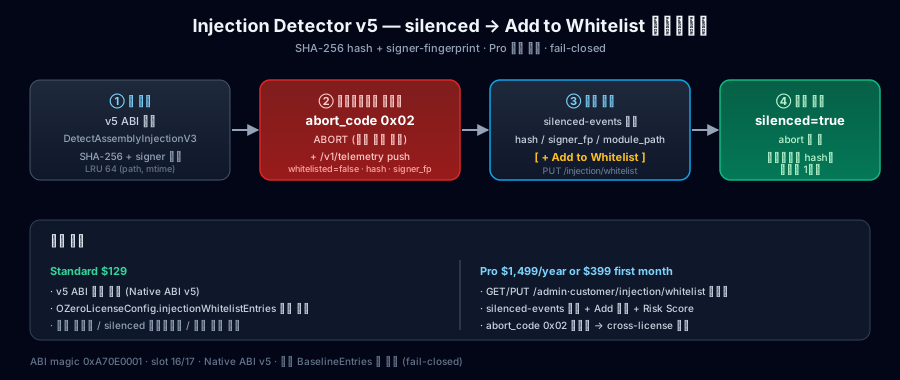
用于把模块注册为 Injection 检查中的可信模块的 API。适用于随游戏一起分发的 overlay、录制工具、运营插件或合作伙伴模块等正常模块,但这些模块可能会被检测命中。HashHex 是该模块文件的 SHA-256 hash,SignerHex 是模块签名证书的 SHA-256 hash。不要猜测这些值,只注册从实际分发文件或诊断结果中确认的值。
数据结构 — OZeroInjectionWhitelistEntry
[Serializable]
public class OZeroInjectionWhitelistEntry
{
    // SHA-256 of the matched module file. Lowercase 64-char hex. Required.
    public string HashHex { get; set; }

    // SHA-256 of the module's signing certificate. Lowercase 64-char hex.
    // Empty ("") means "match by hash only" (only mode for Android .so / Linux ELF).
    public string SignerHex { get; set; }

    // Module file format hint — "pe" | "macho" | "so". Defaults to "so".
    public string Type { get; set; }

    // Optional human-readable note (UI / audit only — never sent to native).
    public string Comment { get; set; }
}
在 Unity 中注册本地可信模块条目时使用的数据结构。HashHex 是必填的 64 字符 SHA-256 文件 hash,SignerHex 是可选的 64 字符 signer fingerprint。Type 是 pe、macho 或 so 之一,用于表示模块格式;Comment 是给运营人员看的备注。
运行时 API — OZeroDispatch
// Returns true when trusted-module policy support is available.
public static bool HasInjectionV3 { get; }

// Replace trusted module entries atomically. Pass null/empty to clear.
// Returns false when the runtime support is unavailable.
public static bool RegisterInjectionWhitelistHash(OZeroInjectionWhitelistEntry[] entries);

// Trusted-module aware scan. Returns true when a relevant runtime signal is observed.
// Output fields are diagnostic context for your review and may be empty.
public static bool DetectAssemblyInjectionV3(
    out bool   silencedByWhitelist,
    out string hashHex,
    out string signerHex,
    out string matchedModulePath);
用于在运行时将可信模块列表传递给原生检查器,或确认当前平台是否支持此功能。多数项目只需要 Config Dashboard 中的 Injection 设置。如果必须从代码直接调用,请在分发文件确定后只注册必要条目,并在 QA 日志中确认注册前后的结果。
配置 — OZeroSecurityConfig.InjectionSettings
// Preferred local trusted-module surface in the Injection settings.
public OZeroInjectionWhitelistEntry[] InjectionWhitelistEntries { get; }
public bool EnableWindowsSystemModuleScan { get; }
InjectionWhitelistEntries 是 Injection 设置中的本地可信模块列表。它不是为了大范围允许客户 PC 上偶然安装的程序,而是用于注册开发商随游戏一起分发并确认正常工作的模块。这个本地列表所有 tier 都可以使用;Pro 客户可以通过客户门户的服务器管理 whitelist 在运营中更新同类策略。
返回 Injection 设置中 enableWindowsSystemModuleScan 的当前值。此属性为只读。若需更改,请调整 Unity 中的 Injection 设置,或应用 Low、Standard、Strict 安全预设。
发现不熟悉的系统模块时,不会立即关闭游戏,而是先记录以供查看。重复出现或文件没有嵌入式签名,都不会单独触发拦截。现有允许规则仍然有效;通过文件哈希明确禁止的模块仍会按策略拦截。请在 Unity 的 Injection 设置中调整此选项,Pro 门户不支持远程修改。此选项不影响其他平台。